A fast, simple, and secure web browsing experience
Embark on a journey into the digital realm with Yandex Browser, a cutting-edge, free, and high-speed web browser that revolutionizes the very essence of user-friendly browsing. Keep reading and explore the distinctive features that elevate it above the competition.
Top Recommended Alternative
With Yandex Browser, you immerse yourself in a harmonious blend of streamlined functionality, personalized settings, and top-notch security, establishing it as the preferred browser for users across the globe. It has gained attention for trying to combine slick design, built-in security, and extra features like voice search, its “SmartBox” search/address bar, and integrations with Yandex’s ecosystem.
Stylish features amid privacy warnings
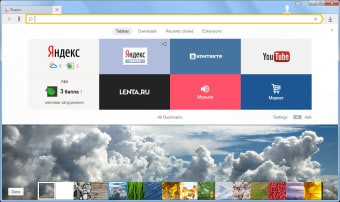
Yandex Browser is an experience of the convenience of a combined address and search bar, personalized website recommendations, and a dedicated drop-down panel. This browser also offers automatic translation and Tableau for easy access to frequently used apps. With built-in Kaspersky antivirus and Opera Turbo technology, it ensures secure and swift browsing. Its target seems to be users who want more than just basic browsing, but without being overwhelmed by bloat.
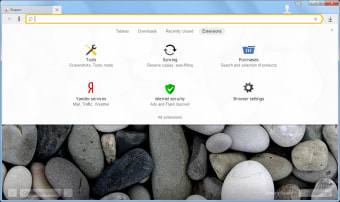
This web browser comes with several security features, including DNSCrypt, DNS spoofing protection, and auto HTTPS support. On unsecure networks, the program automatically runs scans to secure your browsing experience. Having said that, there have been some privacy concerns about the program. In the past, users have been concerned about Yandex collecting search queries. Developers have been reported to send this data to the main Yandex servers in Russia for in-depth analysis.
Competent and feature-rich browser
Recently, this web browser has pushed an update that highlights improved “Protect” mode security and data compression, especially for users on mobile data, plus better ad-blocking integrations. On mobile, it also added voice search, reader mode (simplifying articles), and public WiFi protection as part of its core offerings. Additionally, the app fixed bugs, it also smoothed the UI, and polished rough edges. Although privacy concerns still exist.
In real usage, this app feels fast and visually pleasant. Reader Mode cleans up clutter for long articles; the SmartBox is responsive; tab and bookmark syncing across devices works well. The “Protect” features are reassuring—fraudulent site warnings, public WiFi protection, options to hide interface elements, plus basic privacy tools make it a real option for users. On weaker network connections, the data compression features bring a notable difference.
A capable browser with a privacy trade-off
Yandex Browser delivers a fast, stylish, and secure browsing experience backed by useful tools like SmartBox, Tableau, and built-in protection features. Its speed, clean design, and convenience make it a strong alternative to mainstream browsers. However, recurring privacy concerns remain a sticking point for many users. If you value speed, built-in security, and extra features, Yandex Browser is worth trying—just weigh the trade-off regarding data collection.